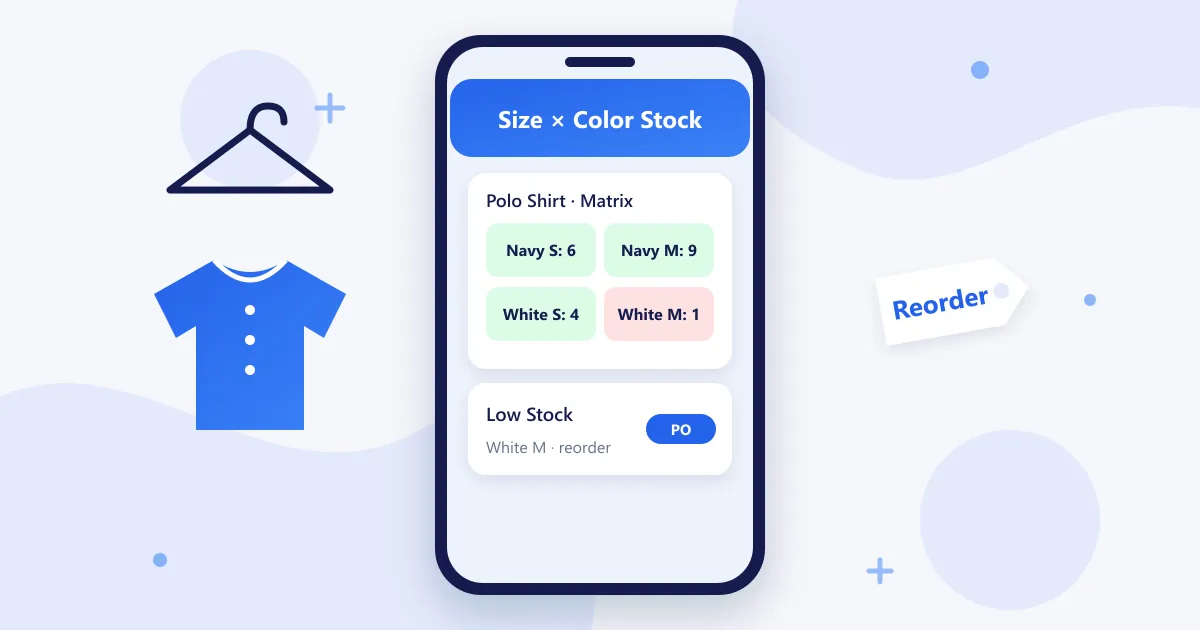
Quick answer: Size and color matrix inventory means you create a product once (for example, a polo shirt) and the POS generates every size and color combination you stock (Navy S, Navy M, White S, White M and so on), each with its own barcode and stock count. You sell, count and reorder per combination, but you report on the style as a whole.
It is the single most important inventory feature for clothing stores, boutiques, kids' shops, shoe stores and accessories stores. This guide explains how to set it up and how to use it day to day.
Why a Flat Product List Fails for Clothing
Without a matrix, a store with 60 styles in 5 sizes and 3 colors has 900 separate products to manage. Staff pick the wrong item at checkout, stock counts drift and you only notice that Medium is sold out when a customer asks for it. A matrix keeps those 900 combinations under 60 styles, so you see the whole picture at a glance.
- Accurate stock: every sale deducts the exact size and color sold.
- Faster checkout: scan the variant barcode instead of searching a long list.
- Better buying: see which sizes sell out first and buy more of them next season.
How to Set Up Size and Color Matrix Inventory: 6 Steps
1. Define your size runs
Write down the size sets you use: adult apparel (XS–XXL), kids (0–3 months to 14 years), shoes (36–45 or US 6–12), or suits (chest × fit). Each product will use one size run.
2. Define your colors
Use a short, consistent color list (Navy, White, Black) rather than supplier names that change every season. Consistent names make reports readable.
3. Create the style once
Add the product with its name, category, season, price and tax rate, then pick the size run and colors. The POS generates every combination automatically.
4. Enter opening stock per cell
Count each size and color and enter it in the matrix grid. This is the only slow step, and you only do it once.
5. Print a barcode label for every variant
Print labels showing style, size, color and price, and tag every item. From now on, checkout and stock counts are a scan, not a search.
6. Set low-stock alerts on the sizes that sell
Set a minimum quantity for your best-selling sizes (usually M and L in adult wear) so the POS warns you before they run out, then raise a purchase order to the supplier.
Using the Matrix Day to Day
| Task | What the matrix does |
|---|---|
| Sale | Deducts the exact size and color scanned |
| Exchange | Returns one size to stock and deducts the other in one step |
| Stock count | Shows expected quantity per cell, so gaps are easy to find |
| Reorder | Lists the sizes below their minimum, ready for a purchase order |
| End of season | Shows which sizes and colors are left, so you can mark them down |
| Multi-store | Transfers a size from one branch to another when one runs out |
Common Size and Color Matrix Mistakes
- Too many colors: "Sky", "Azure" and "Light Blue" for the same shade split your sales data. Keep one name.
- Skipping labels: without a barcode per variant, staff pick the wrong size and the counts drift.
- Equal buying across sizes: use last season's sell-through per size, not an even split.
- Ignoring broken size runs: a style with only XS and XXL left should be marked down, not reordered.
Which Stores Need a Size and Color Matrix?
- Clothing and apparel stores, including menswear and suit shops
- Boutiques and children's boutiques
- Accessories stores (belts by size, wallets by color)
- Cosmetics stores (shades) and vape shops (flavor × strength) use the same idea
RetaPOS Size and Color Matrix
RetaPOS includes size and color matrix inventory, season-wise stock, barcode label printing, low-stock alerts, purchase orders and branch stock transfers for small stores with up to 500 SKUs. It runs on any Android or iOS phone for US$399/year (₹6,000/year in India), with unlimited users and no per-sale software fee. RetaPOS is cloud-based and needs Wi-Fi or a 4G/5G connection.
See the RetaPOS Garment Store POS →
Size and Color Matrix: Frequently Asked Questions
What is a size and color matrix in inventory?
A size and color matrix is a grid that stores one product style as every size and color combination you sell, each with its own stock count and barcode. RetaPOS creates the grid automatically when you add a style, so you sell and reorder per size while reporting on the style as a whole.
What is the best POS system with size and color matrix inventory?
For a small clothing, kids or accessories store, the best POS with size and color matrix inventory generates every variant from one style, prints a barcode per variant and alerts you before best-selling sizes run out. RetaPOS includes all three for US$399/year, with no add-on fee.
How many SKUs does a size and color matrix create?
Multiply sizes by colors: a shirt in 5 sizes and 3 colors creates 15 SKUs. RetaPOS is designed for stores with up to 500 SKUs, which fits most independent clothing shops and boutiques; count your variants, not just your styles, when you plan.
Can I manage shoe sizes with a size and color matrix?
Yes. Set your shoe size run (for example 36–45 or US 6–12) as the size list and your colors as the second dimension. RetaPOS then tracks stock per size and color and prints a barcode for every pair.
Bottom Line
A size and color matrix is the difference between guessing and knowing what's on your shelves. Set up your size runs and colors once, label every variant and let low-stock alerts tell you what to reorder. RetaPOS does this on the phone you already own.